Preparing DALiuGE graphs in EAGLE
Prepare the scientific workflow in EAGLE, but keep execution identity, credentials, storage endpoints, and scheduler details outside the logical graph. A Beampipe-ready graph has two small, stable integration points:
beampipe-ingestintroduces Core's immutable execution manifest at the graph boundary.beampipe-publishruns after the project pipeline has finished, publishes and verifies the required products, and emits the canonical output inventory.
Both are native DALiuGE applications supplied by the public
beampipe-palette package. They are
not embedded PyFunc source and they do not call back to Core.
The finished shape
The screenshot below is the real WALLABY no-download graph open in EAGLE
7.0.1. The graph enters through beampipe-ingest on the left and finishes
through beampipe-publish and output inventory on the lower-right branch.
The project-owned processing graph remains between those two boundaries.
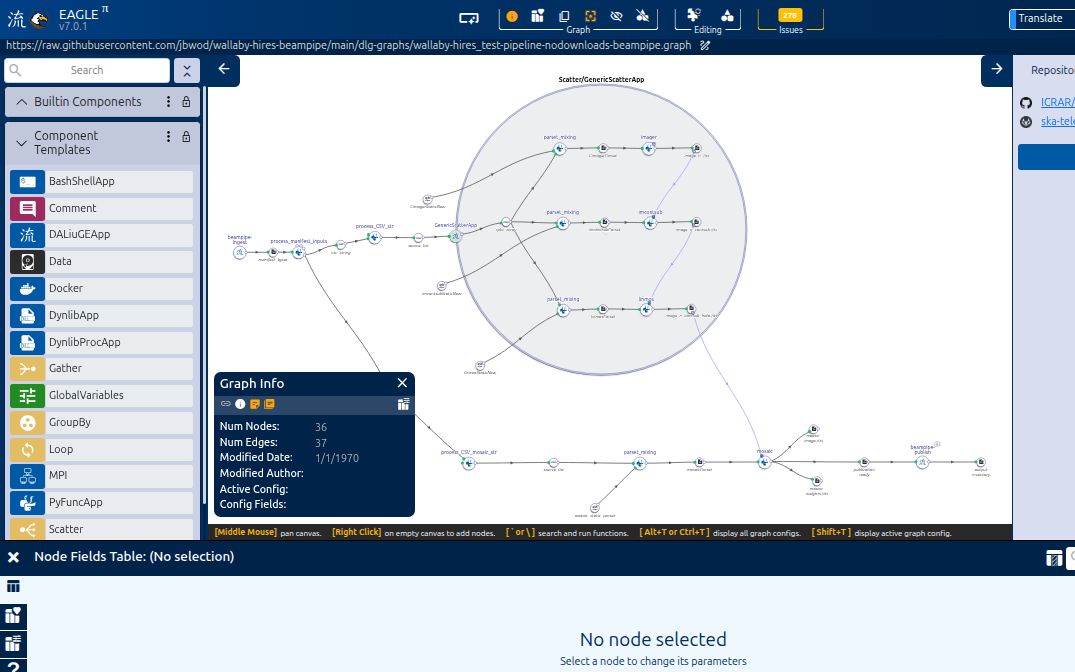
Real EAGLE capture of the
wallaby-hires_test-pipeline-nodownloads-beampipe.graph
contract. The screenshot was captured from commit fcdca2e2 with
beampipe-palette 0.5.1.
The visual order is the execution order:
Core manifest
    |
    v
beampipe-ingest -> manifest_bytes FileDROP -> project applications
                                                     |
                                                     v
                                      completion FileDROP
                                                     |
                                                     v
                                         beampipe-publish
                                                     |
                                                     v
                                          inventory FileDROP

Core later pulls the byte-identical receipt from the remote session over SFTP.
There is no graph edge, URL, or bearer credential back to Core.
Load the Beampipe palette
Install the same release into the Python environment used by every DALiuGE execution node:
python -m pip install \
  https://github.com/jbwod/beampipe-palette/releases/download/v0.5.1/beampipe_palette-0.5.1-py3-none-any.whl
python -m beampipe_palette --version
In EAGLE, select Palette → Load and open beampipe.palette. The wheel
installs the palette under:
The palette adds exactly two project-neutral application templates:
| Palette component | Native class | Purpose |
|---|---|---|
beampipe-ingest |
BeampipeIngestApp |
validate and emit Core's canonical manifest |
beampipe-publish |
BeampipePublishApp |
publish, verify, and inventory durable products |
Loading the .palette file gives EAGLE the node and port metadata. It does not
install the Python implementation on the DALiuGE runtime. The package version
must therefore be present and importable on every execution node:
Pin the graph and runtime package together. Updating either native application contract requires a new graph digest and another translation/runtime check.
Wire beampipe-ingest
Place beampipe-ingest at the entry boundary. It accepts no input DROPs and
has one manifest_bytes output. Connect that output to a path-backed FileDROP,
then connect the FileDROP to the first application that consumes the manifest.
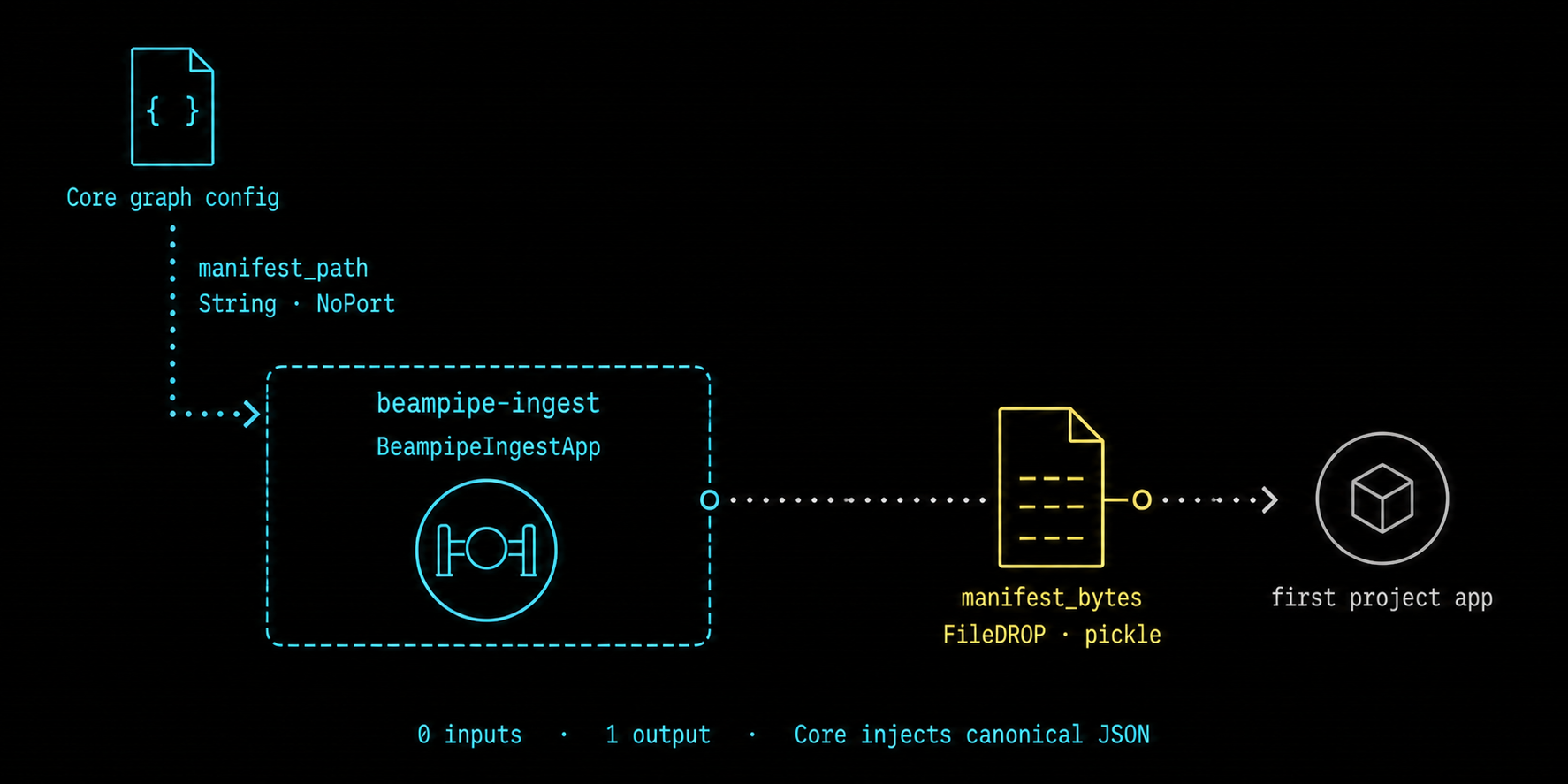
The configuration arrow is not a data DROP. Core supplies manifest_path as
a NoPort graph setting; the only graph output is manifest_bytes.
| Field or port | EAGLE contract | Owner |
|---|---|---|
| node name | exactly beampipe-ingest |
graph author |
manifest_path |
String, NoPort |
Core injects inline canonical JSON |
manifest_bytes |
one OutputPort to a FileDROP |
native application |
| encoding | pickle at a named PyFunc boundary |
graph author |
Do not fill manifest_path with a workstation path for a Core-managed graph.
Core finds the exact node and field name, injects the execution's immutable
manifest as graph configuration, and records the patched graph checksum.
The native application validates and canonicalizes the manifest before
writing it once. Its output intentionally uses one pickle layer: DALiuGE 6.6
named PyFunc inputs decode pickle ports to the original canonical bytes. If
the next application is also native, keep the data contract explicit and test
the chosen encoding through the installed DALiuGE version.
Build a truthful completion barrier
beampipe-publish must not become runnable merely because the graph was
deployed. Feed it one project-owned completion FileDROP that becomes complete
only after every required scientific output is closed and stable.
Good completion signals include:
- a dedicated FileDROP written by the final successful application;
- a gather/barrier output downstream of every required product branch; or
- a final application output created only after all child work has succeeded.
Avoid an unconnected publisher input, an always-present configuration file, or a marker created before output writers close. Those arrangements can publish an incomplete result set while the scientific graph is still running.
The completion DROP is causal only. Product discovery starts from the
Core-supplied BEAMPIPE_OUTPUT_ROOT; product paths are not carried in the
completion payload.
Wire beampipe-publish
Place beampipe-publish after the completion barrier and connect its single
inventory output to a terminal path-backed FileDROP. The inventory DROP is
useful to DALiuGE and operators; Core separately retrieves the byte-identical
attempt-scoped handoff after Slurm reports COMPLETED.
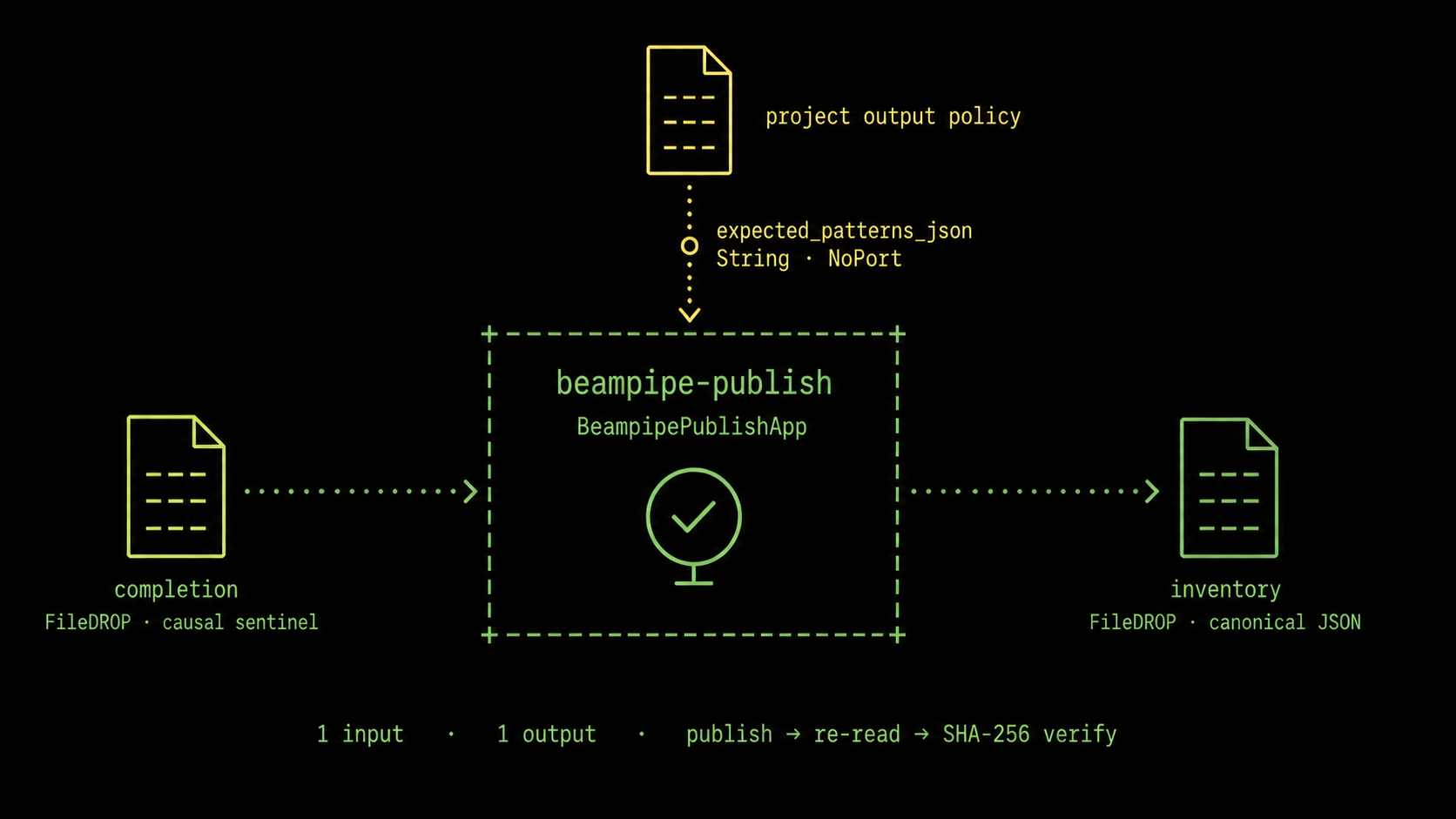
Only the completion and inventory connections are DALiuGE data edges.
expected_patterns_json is a project-owned NoPort setting, and the native
application performs publication, durable read-back, and SHA-256 verification.
| Field or port | EAGLE contract | Owner |
|---|---|---|
| node name | exactly beampipe-publish |
graph author |
completion |
exactly one FileDROP InputPort |
project graph |
inventory |
exactly one FileDROP OutputPort |
native application |
expected_patterns_json |
String, NoPort, JSON array |
project policy |
For example:
The value must be a JSON string array, not an EAGLE Json field. EAGLE and
DALiuGE otherwise coerce the value before the native application sees it.
Keep the list in the same order as the active project policy:
output_verification:
  required: true
  inventory_schema: beampipe-output-inventory/v1
  expected_patterns:
    - "**/image*.10arc.final_mosaic.fits"
    - "**/weights*.10arc.final_mosaic.fits"
Core requires exact pattern equality and recomputes every count from the inventory. A missing product, zero match, changed order, or unexpected pattern keeps the execution out of terminal success.
Do not add graph fields for the output root, destination URI, execution UUID,
attempt, handoff path, SSH details, or storage credentials. The deployment
runtime supplies those values as fixed BEAMPIPE_* environment variables.
Save and pin the graph
Before exporting from EAGLE, check:
- the two native nodes contain no
func_codeor PyFunc implementation; beampipe-ingesthas zero inputs and onemanifest_bytesoutput;- the manifest FileDROP uses the encoding expected by its consumer;
- the publisher has exactly one completion input and one inventory output;
- the completion signal is downstream of every required product writer;
expected_patterns_jsonis a valid JSON string array and matches project YAML exactly;- the inventory FileDROP is terminal and is not reused as a science product;
- no secret, Core URL, local path, or remote login is stored in graph JSON; and
- EAGLE validation and DALiuGE translation complete without dangling ports.
Export the logical .graph, calculate its SHA-256, and pin both path and digest:
Then exercise Core's preparation boundary:
beampipe graph prepare --project PROJECT_ID --source SOURCE_ID
beampipe graph diff --execution EXECUTION_ID
beampipe daliuge translate --execution EXECUTION_ID
Review the source graph, patched graph, manifest, and physical graph hashes.
For a runtime qualification, deploy a disposable execution using the exact
DALiuGE, project package, and beampipe-palette versions intended for
production. Translation alone cannot prove native Python imports, port
encoding, filesystem visibility, or publication durability.
Responsibility boundary
| Layer | Responsible for |
|---|---|
| EAGLE graph | scientific topology, named ports, completion causality, project output patterns |
beampipe-palette |
manifest validation, native DALiuGE applications, durable publication and canonical inventory emission |
| project configuration | pinned graph digest, manifest policy, exact expected output patterns |
| deployment profile | DALiuGE/runtime availability, storage destination, SSH/SFTP control path |
| Beampipe Core | immutable manifest injection, graph patching and hashing, submission, scheduler reconciliation, receipt retrieval and ledger verification |
Continue with Graph patching for deterministic mutations, Output verification (in progress) for the inventory and SFTP handoff contract, and Deployment profiles for runtime and remote-system checks.