Dashboard tour
Beampipe Dash is the optional web
operator console for Beampipe Core. It calls the authenticated /api/v2
interface through a server-side BFF; it does not own a database, execute jobs,
or infer workflow state independently of Core.
Install and sign in
Start Core, then check it. beampipe start returns after starting a Docker
installation. Native host mode stays in the foreground, so run it in one
terminal and run the checks and Dashboard setup from another.
Setup normally creates the first administrator. If an existing database has no account, bootstrap one from the Core CLI. Prefer the interactive password prompt so the secret does not enter shell history:
beampipe admin create-user \
  --username operator \
  --email operator@example.org \
  --name 'Beampipe Operator'
Install Dash on the same Docker host:
beampipe setup --dashboard

# Equivalent standalone installer:
curl -fsSL https://raw.githubusercontent.com/jbwod/beampipe-dash/main/scripts/install.sh | sh
Open http://127.0.0.1:3000 and sign in with the Core account. The browser
talks only to Dash. On the shared Compose network, the Dash server uses
http://api:8080; native Dash uses Core's host publish, normally
http://127.0.0.1:18080. BEAMPIPE_API_URL is always from the server's
viewpoint, not the browser's.
The screenshots on this page use Dash's checked-in synthetic Beampipe fixture. They are safe documentation examples rather than evidence from a production deployment.
Control-plane overview
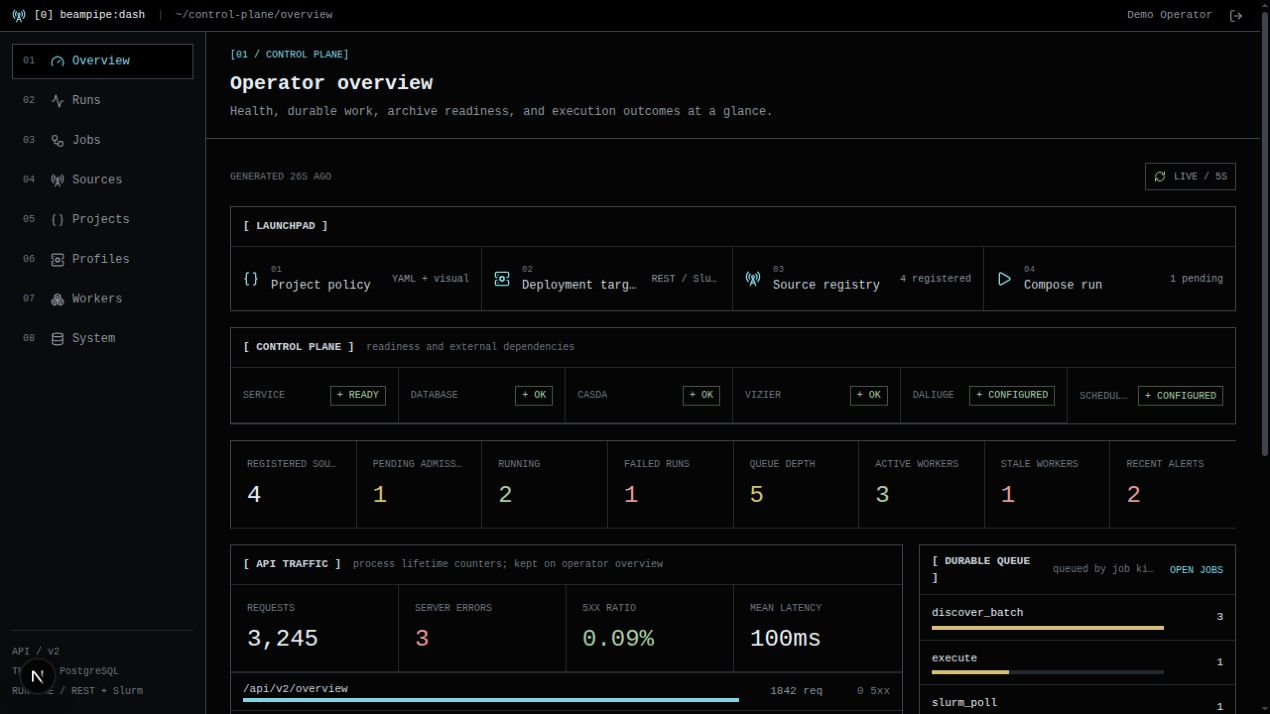
The overview brings several Core signals together for triage:
- authenticated readiness for PostgreSQL, queues, configured provider probes, and workers;
- registered sources and pending workflow admission;
- running and failed executions;
- active or stale workers and durable queue depth;
- recent API traffic and operator alerts.
Dash reports these values; Core's database, readiness probes, worker registry, and execution ledger remain authoritative.
Project studio
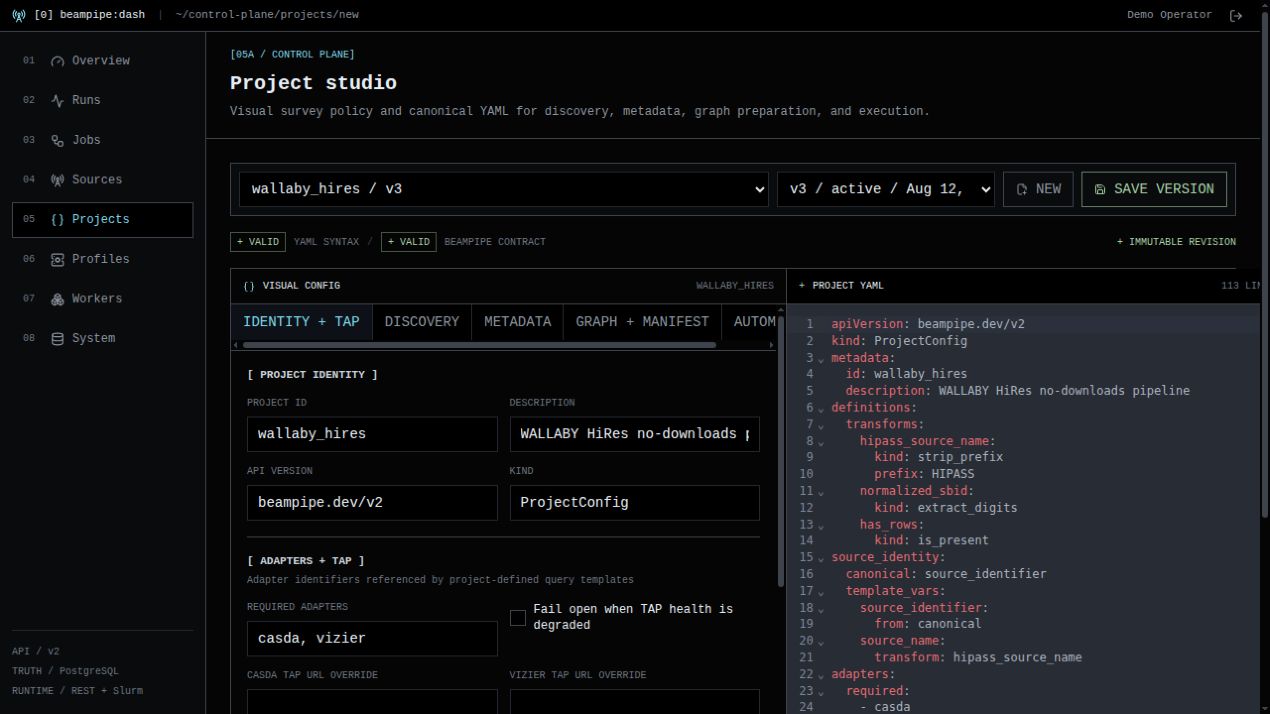
The project studio keeps the form-based survey policy and canonical
beampipe.dev/v2 YAML visible together. A successful save creates an immutable
project-config revision in Core. Executions pin a revision, so editing a later
version cannot silently change an existing run.
Use the Core project YAML reference for schema, transform, query, graph, and automation semantics.
Run detail
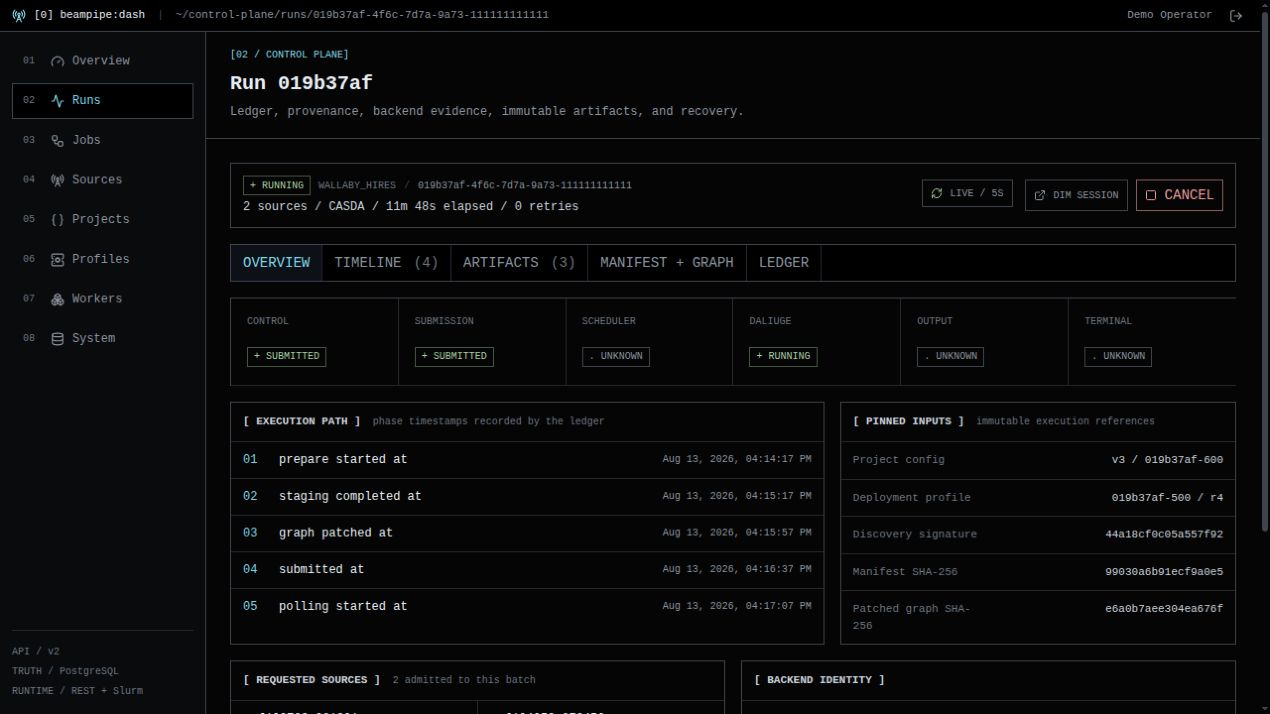
The run explorer follows Core's durable execution model. It exposes normalized control, submission, scheduler, DALiuGE, output, and terminal states alongside phase timestamps and pinned inputs. Timeline, artifact, graph, manifest, and ledger tabs retain the raw evidence needed for diagnosis.
Use Recovery and cancellation when interpreting failed, uncertain, cancelled, or externally running work.
Alerts
Dash Alerts (/alerts) is the operator UI for Core's in-app notification
channels and rules. Superusers can create a webhook (generic, Slack, or
PagerDuty template), bind it to a trigger such as execution failure, discovery
change, or the 24h digest, and send a test payload. The test result is the
redacted delivery row, not the upstream HTTP body. Other authenticated users
can list channels, rules, and deliveries. Secrets stay in Core; Dash omits
redacted fields on save unless a new value is typed.
Prometheus/Alertmanager remains a separate infra-health path. See
Observability for trigger kinds and the
headless curl equivalents.
Connect Dash to Core
For a single Docker engine, run Dash scripts/install.sh (or beampipe setup --dashboard). It attaches Dash to Core's private Compose network and sets BEAMPIPE_API_URL=http://api:8080. Publish Dash—not the Core API—to the operator LAN or reverse proxy. See Install and configure for the setup flags.
Open System after login and confirm service/PostgreSQL readiness, the provider probes exposed by Core, a healthy worker pool, and no unresolved critical diagnostic. The DALiuGE and Slurm tiles report configuration/profile ownership; they do not prove backend connectivity. Use Deployment target > Test profile for that. The equivalent headless checks are:
Continue with the Dashboard operator workflow. Use Dashboard deployment and security for native Node.js, TLS proxy, cookies, and production topology, and Dashboard architecture for the BFF and data ownership boundaries.
Common startup failures
| Symptom | Check |
|---|---|
| Login says Core is unavailable | BEAMPIPE_API_URL is reachable from the Dash server/container |
Login returns 401 |
The Core account exists and the password is correct |
Mutations return 403 behind a proxy |
Proxy overwrites Host, X-Forwarded-Host, and X-Forwarded-Proto |
| Session immediately expires over HTTPS | Set BEAMPIPE_DASH_SECURE_COOKIES=true |
| Project save or profile test is disabled | The Core account must be a superuser |
| Sources never leave discovery | Inspect Jobs, Workers, TAP health, and discovery capability |